Quiet Ambition Quiet Ambition
Big goals, small noise.
RSS

How to Sell Online: An 8-Step Practical Playbook

Most people trying to sell online get stuck at the wrong point. They build too much before validating, price by guesswork, and treat their landing page like a portfolio. This playbook walks through the complete process from offer creation to retention - the same framework behind the Selling Online guide at yuzool.com/guides/selling-online.html.

Step 1: Decide What to Sell (Without Burning Out)

The starting question most people ask is "what can I make?" but the better question is what you can repeatedly deliver at high quality and keep improving every month. The goal is an offer with clear customer outcomes and low support overhead.

There are four sellable formats worth picking from: a productized service (fixed-scope with clear deliverables), a digital asset (templates, checklists, mini-courses), a paid workflow tool (a niche utility that saves time), or a hybrid ladder (a low-ticket item that leads to a high-ticket service). Validate before building. Start with five paid conversations or pre-sales, not 500 social media likes. Write a one-page promise describing who it helps, the result, the timeline, and the constraints. If you can’t answer questions about it clearly, the offer needs to be tightened first. The minimum launch checklist: one buyer persona, one problem, one core promise, one CTA, one checkout path, and one delivery timeline.

Step 2: Price Your Offers So Customers Understand Fast

Strong pricing is mostly a clarity problem. If a buyer can’t explain your offer in one sentence, conversion drops. A simple three-tier value ladder works well: an entry offer that is low-risk and builds trust, a core offer that is your main product or service transformation, and a premium offer for done-with-you or done-for-you acceleration.

Name offers by outcome, not by your internal process. Limit tiers to three to keep decisions simple. Price by the value you deliver, then sanity-check it against effort. Some examples that work well in the creator and freelancer space: a template pack bundled with a setup call, an audit plus implementation checklist with an optional sprint, or monthly retained support with strict scope limits.

Step 3: Set Up Checkout That Doesn’t Leak Revenue

Checkout is where momentum dies if buyers have to think too much. The rule is simple: one offer, one button, one next step. Every CTA on the page should match the offer exactly. Don’t send people through multiple unrelated pages before payment. Show what happens after they pay, right near the buy button. Put refund and terms links close to checkout - it reduces hesitation rather than creating it.

For payment links: create separate links per offer tier, name them by outcome (not internal SKU names), track which page each link is used on, and test every link on mobile before publishing. Tools like Invoice Terminal (yuzool.com/invoice) work well for high-ticket client flows, while Sequence (yuzool.com/sequence) can handle non-pushy follow-up for prospects who don’t convert immediately.

Step 4: Build a Storefront That Actually Sells

A selling page is not a portfolio page. It should guide people from problem to decision with as little friction as possible. The core structure of a good sales page: the top fold shows your promise, who it’s for, and one clear CTA. Below that comes proof - outcomes, examples, short testimonials. Then the offer block: what’s included, what’s not, and the delivery timeline. Finally a risk reducer section with guarantees, FAQ, and support expectations.

Most creator traffic is on mobile, so test every section on narrow screens. Keep paragraphs short, use visible section labels, and repeat CTA buttons at natural decision points. Use a tool like Wireframe (yuzool.com/wireframe) to map page hierarchy before writing the final copy, then move into Landing Page Generator (yuzool.com/landing) to publish.

Step 5: Find Customers Without Playing the Algorithm Lottery

Customer acquisition starts with precision, not volume. You need a narrow audience with urgent problems and clear buying triggers. Four audience mapping questions to answer first: Who has this problem weekly (not yearly)? Where do they already ask for help publicly? What have they already paid for in the last 12 months? What outcome would make your offer an easy yes?

The acquisition channels that compound best are: problem-first short posts with one CTA pointing to a specific offer, small direct outreach batches with tailored examples, partnerships with adjacent creators or consultants serving the same audience, and case-study loops that show before/after snapshots with real context. Use Nexus (yuzool.com/nexus) for contact tracking and Signal (yuzool.com/signal) for daily opportunity scanning.

Step 6: Create Content That Builds Buyers, Not Just Views

Treat content as a product funnel: every piece should move someone one step closer to your offer. The weekly content stack that works is: one core long-form insight, three short cuts derived from it (examples, mistakes, a checklist), one case snippet showing a real transformation, and one direct CTA post pointing to a specific offer page.

To avoid burning out on content: reuse frameworks instead of inventing new formats every week, write from active client work and real objections, and track which topic angles create replies - not just impressions. Zen Writer (yuzool.com/zen-writer) is good for deep writing sessions. Notes (yuzool.com/notes) works well for collecting reusable hooks and objections. Clip (yuzool.com/clip) can take one long draft and reformat it for multiple channels.

Step 7: Deliver in a Way That Earns Repeat Buyers

The sale isn’t the finish line. Post-purchase experience determines refunds, referrals, and long-term revenue quality. Every delivery needs four things: instant acknowledgment so the buyer knows payment worked, clear start instructions for the first 24 hours, a predictable timeline of what arrives and when, and defined support boundaries - where to ask questions and what the response windows are.

The three most common fulfillment mistakes: overloading buyers with too many files and no clear path through them, sending no onboarding message so buyers hesitate and churn, and leaving ownership of implementation tasks unclear. Use Notes to maintain SOPs and delivery checklists. Clip helps standardize delivery emails and docs. Nexus keeps client context and follow-up timing in one place.

Step 8: Build Retention Systems That Keep Revenue Stable

Real online businesses are built on repeat trust. A retention system keeps customers engaged, generates referrals, and reduces the constant pressure to chase new leads. The basics: send structured post-purchase check-ins at fixed intervals, create upgrade paths from entry offers to premium outcomes, collect common objections and turn the answers into product assets, and track churn reasons so you can update onboarding and offer copy monthly.

Operational habits that protect margin: run a weekly pipeline review covering leads, invoices, and follow-ups. Batch support and fulfillment tasks with clear SLAs. Use templates for repeated communication and contract changes. Sequence handles follow-up workflows. Invoice Terminal (yuzool.com/invoice) keeps payment records clean. Daily Four (yuzool.com/daily-four) keeps the top revenue tasks visible every single day.

Where to Start

These eight steps form a complete loop from offer to repeat revenue. The order matters: build the offer before the page, price before building checkout, acquire customers before scaling content. If you’re not sure where to start, pick the step that’s currently the biggest bottleneck in your business and work from there.

The full guide with all eight deep-dive steps is at yuzool.com/guides/selling-online.html - each section includes specific Yuzool tools mapped to that part of the workflow so you can move from reading to doing without switching context.
What's New at Yuzool Studio — February 2026 Roundup

A lot has shipped at Yuzool Studio over the past two weeks. Here's a quick summary of everything that's new across the suite as of February 23, 2026.

The Studio now has 33 tools across 5 modules: Build and Launch, Publish and Monetize, Client Ops, Focus and Personal, and Library and Discovery. No account is required, and everything is built on a local-first foundation.

February 21 - Pricing Direction

The Studio has moved to one-time pricing. The goal is to keep adding value to the core suite while keeping pricing fair. Two new market guides are also live: Creator Economy Trends 2026 and State of the Creator Economy, covering monetization examples, offer ladders, and execution playbooks.

February 19 - Unified Dashboard Home

The Studio dashboard is now the default home page at yuzool.com. All modules (build, publish, ops, focus, and library) are now accessible from a single unified view. Legacy pages like tools.html and builders.html redirect to the new dashboard. Invoice Terminal and Sequence now work as a connected workflow — hitting "Track" in Invoice prefills Sequence with the client details so follow-up is instant. New audience pages for creators and consultants went live, along with a creator philosophy page and a competitor comparison table covering platforms like Stan, Kajabi, Podia, and HoneyBook.

February 18 - Wireframe Launch

Wireframe is now live - a fast low-fidelity layout tool for planning page structure before you move into the Landing Builder for final output. Also launched: Pimp My Site, a conversion-focused landing page polish service for teams needing stronger messaging and cleaner UX quickly.

February 16 - Notes Is Live

Notes is a new local-first notes vault with notebooks, tags, pinned notes, trash, search, sort, and backup import/export. It supports both Markdown and WYSIWYG editing with autosave and per-note mode switching.

February 16 - UtilHub Expansion

UtilHub gained 15 new tools: REST Client, Password Generator, Checksum, JSON Mapper, DateTime Converter, Word Count, Color Palette, Cron Builder, Calculator, Diagram Editor, Shape Snap, Command Vault, Pomodoro Timer, Clipboard Manager, and Emoji Picker. CSV to JSON now supports file upload and direct paste, with improved delimiter control and more resilient parsing.

February 15 - Bored Hub Is Live

Bored Hub is a dedicated break section bringing together mini-games, short reads, and daily curiosity content in one place. Designed for quick, low-friction dips when you need a reset.

February 13 - Builder Suite Expansion

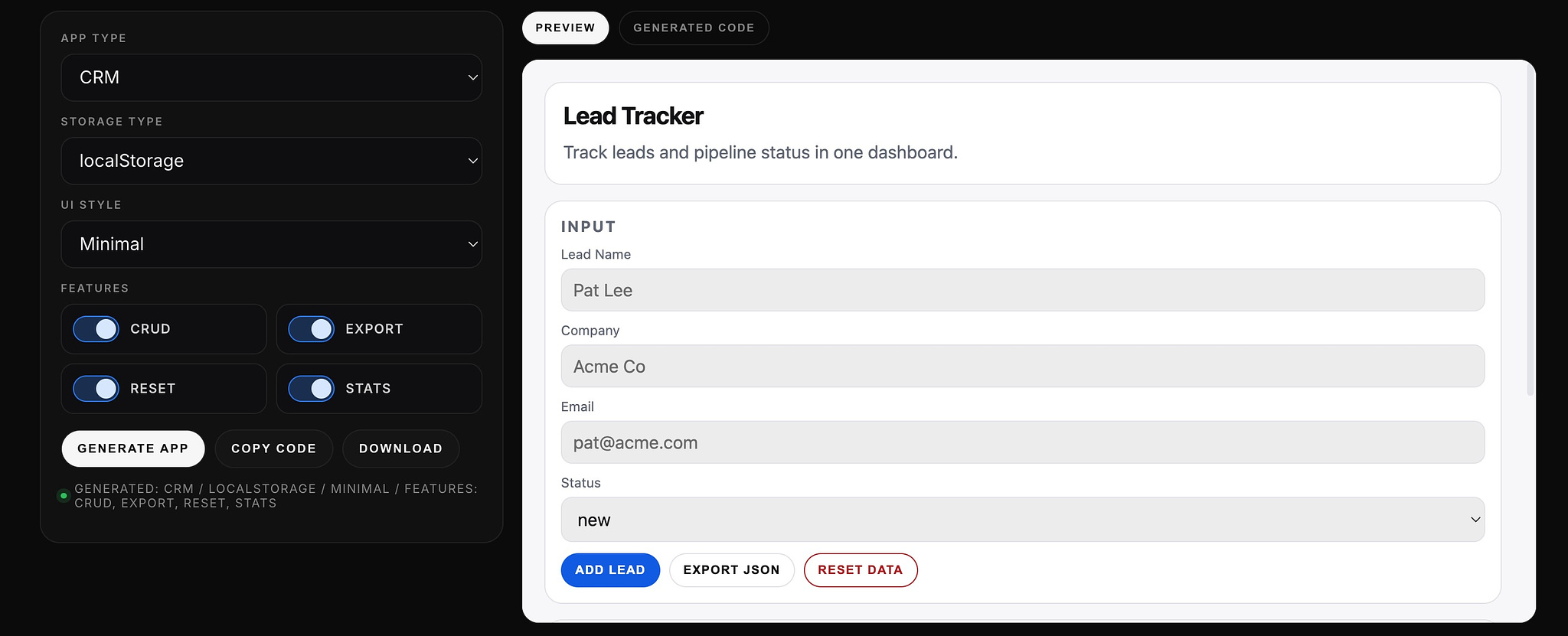
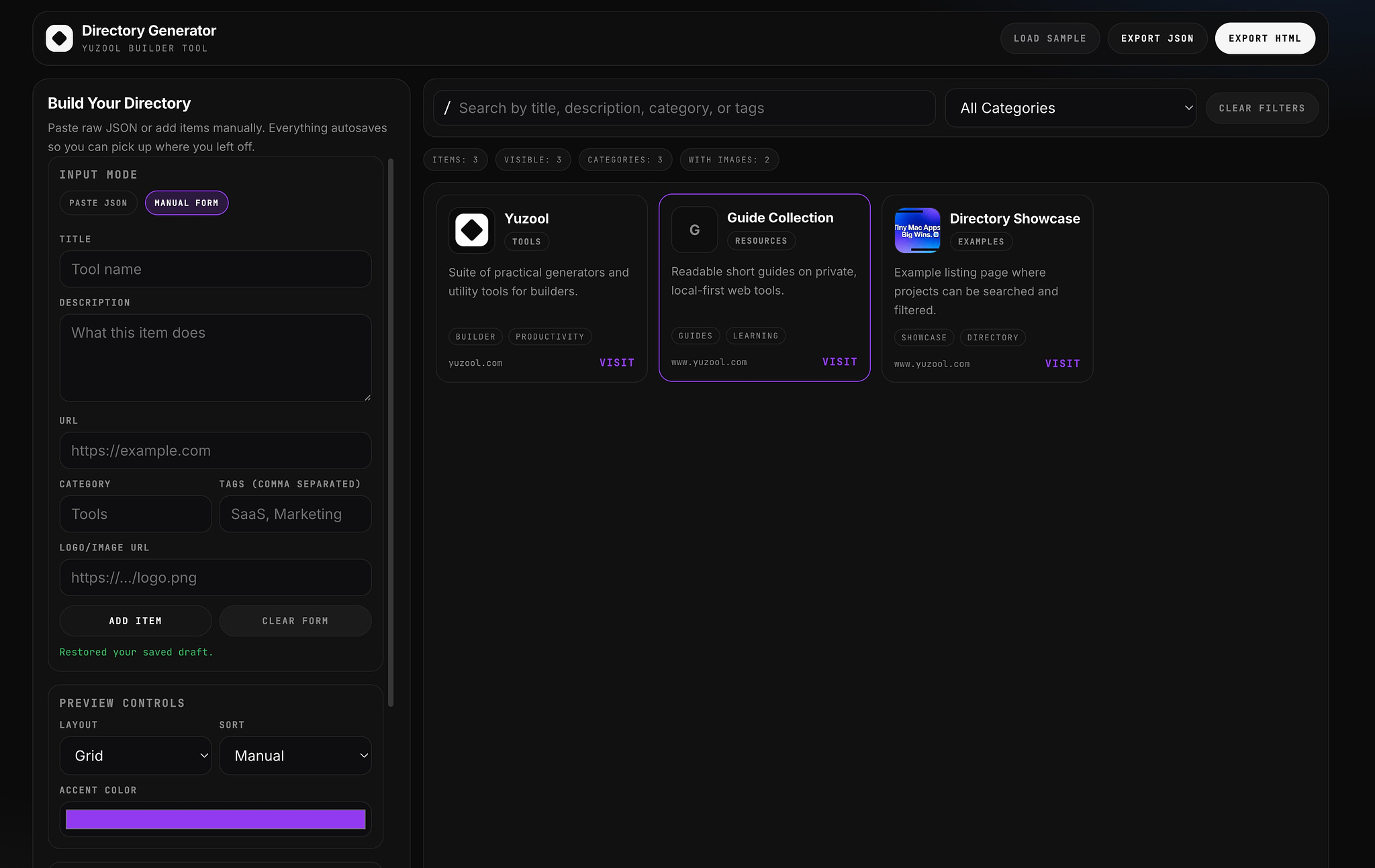
Two new builders shipped: Directory Generator (create searchable directories from JSON or manual entry, with localStorage autosave and standalone HTML export) and One-Page App Generator (build one-page apps from templates with app type, storage, style, and feature toggles, exported as a complete index.html). The homepage suite navigation was also updated with a new Builder category.

February 12 - Latest Rollout

Showcase Directory launched as a public builder directory for community products. Signal launched as a daily signal board pulling leads, stories, business ideas, and prompt content into date-based archived editions (with sources including Dribbble Jobs and We Work Remotely). The What's New changelog page itself went live here too.

That's everything from the past two weeks. The full changelog is at www.yuzool.com/whats-new.html and the studio is at yuzool.com.

Two New Builders: Create Apps and Directories Without Code

Two tools just launched in The Studio that change how quickly you can ship something useful.

One-Page App Generator

One-Page App Generator

Build focused, single-purpose tools without code.

Think calculators, converters, simple dashboards, or internal utilities. No setup. No backend. Just a clean interface that works instantly.

Perfect for:

• Small business tools

• Client-facing calculators

• Internal team utilities

• Portfolio projects

• Quick MVPs

Build it. Export it. Ship it. Done.

https://www.yuzool.com/one-page-app-generator.html

Directory Generator

Directory Generator

Create searchable, filterable directories in minutes.

Showcases, resource lists, product catalogs, team directories—anything that benefits from structure and discoverability.

We're using it ourselves for The Studio showcase: https://www.yuzool.com/directory.html

A curated index of tools people have built using The Studio. Browse by category, search by keyword, visit live builds.

It's proof that the directory generator works—and it took almost no time to set up.

https://www.yuzool.com/directory-generator.html

Why This Matters

Most "no-code" tools hide complexity behind abstraction. These don't.

They let you build one thing well. Export clean HTML. Host it anywhere. No dependencies. No lock-in.

Speed matters. These tools remove friction so you can focus on what you're actually building instead of how to build it.

Both available now in The Studio.

Running an Online Business Slowly: The Case for Minimalism in Design and Operations

The most successful online businesses are not always the fastest or the loudest. Sometimes the most sustainable path is the slowest one.

Why Speed Became the Default

Somewhere along the way, online business culture decided that success meant constant acceleration. Ship faster. Scale harder. Grow at any cost.

This created a default operating mode:

• Launch quickly and iterate publicly

• Add features to stay competitive

• Be visible everywhere

• Optimize for growth metrics above all else

But speed creates friction. Complexity accumulates. Burnout becomes inevitable.

For many solo builders and small teams, this pace isn't sustainable. It's also unnecessary.

The Case for Slowness

Running a business slowly isn't about being lazy. It's about being intentional.

Slow business means:

• Building only what serves the core purpose

• Saying no to distractions disguised as opportunities

• Focusing on a small number of things done well

• Letting systems run quietly in the background

• Prioritizing calm over chaos

This approach doesn't scale quickly. But it scales sustainably.

Minimalism in Design: Removing What Doesn't Matter

Minimalist design isn't about aesthetics. It's about function.

When you remove everything that doesn't directly serve your users, three things happen:

  1. Decisions become faster
  2. Maintenance becomes easier
  3. Users understand what to do immediately

Tools like https://www.yuzool.com/zen-writer.html embrace this philosophy—write without distractions, with nothing but what you need to get words on the page.

The same principle applies to business operations. Every feature, every page, every process should pass a simple test: Does this make the core purpose clearer or cloudier?

If it doesn't clarify, it's clutter.

Minimalism in Operations: Focus on Four

Most online businesses suffer from diffusion. Too many priorities. Too many channels. Too many projects running simultaneously.

A focused approach means choosing what matters most each day and ignoring the rest.

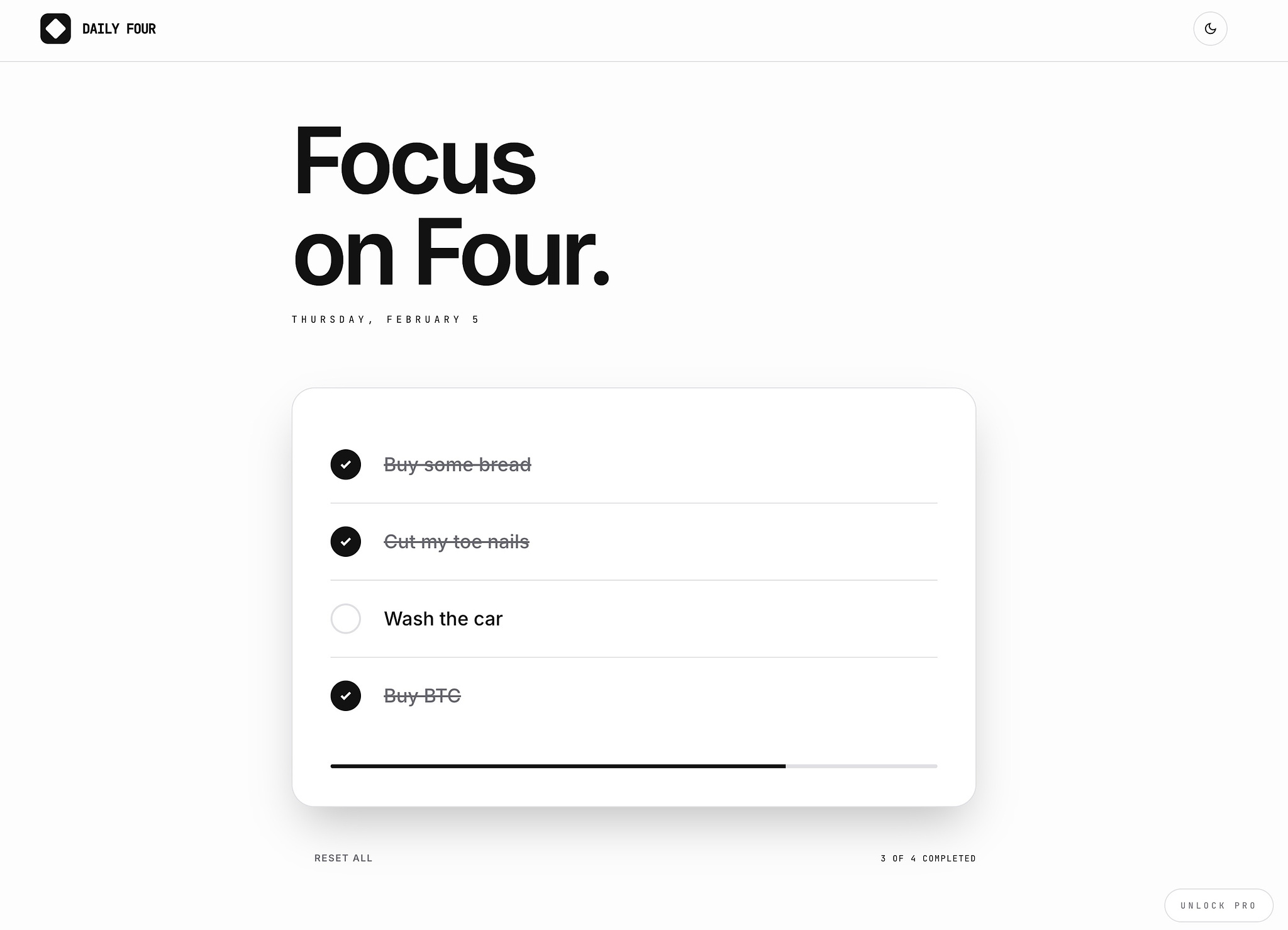
https://www.yuzool.com/daily-four.html is built around this constraint—decide today's four priorities and let everything else wait.

This forces clarity. It prevents the illusion of productivity that comes from doing many things poorly instead of a few things well.

Constraints aren't limiting. They're liberating.

Running Simple Systems

Complexity has a cost that extends beyond the initial build. Every tool you add requires maintenance. Every integration creates a potential point of failure. Every dashboard needs monitoring.

Simple systems reduce this overhead:

• Use focused tools that do one thing well (https://www.yuzool.com/invoice.html for quick invoicing, https://www.yuzool.com/clip.html for extracting structured data)

• Keep processes local and private where possible

• Avoid tracking and analytics that create more noise than signal

• Design workflows that work without you

The goal isn't to avoid all complexity. It's to avoid unnecessary complexity.

Building in Private, Launching When Ready

Slow businesses don't need constant visibility. They benefit from quiet focus.

Building in private means:

• No pressure to perform progress

• Freedom to change direction without explanation

• Space to let ideas develop fully

• Time to ensure something actually works before sharing it

When you do launch, you're not hoping it works. You know it works.

Search and word of mouth will find the right people. You don't need an audience first. You need something useful.

The Emotional Benefit of Slowness

Running an online business slowly creates space for clear thinking.

No notifications demanding attention. No algorithm forcing you to post. No pressure to maintain momentum for appearances.

Just steady, uninterrupted work.

This isn't just about productivity. It's about sustainability. You can't maintain a pace that exhausts you. Slow is how you keep going.

What This Looks Like in Practice

A slow, minimal online business might:

• Offer one or two products instead of ten

• Update a blog when there's something worth saying, not on a schedule

• Use a handful of simple tools instead of a complex stack

• Run profitably without venture funding or aggressive growth targets

• Operate calmly, letting quality compound over time

This won't get you featured in startup publications. But it might give you a life that doesn't require escape.

Slow Is a Strategy, Not a Limitation

The internet rewards both speed and slowness. The difference is that speed gets attention immediately, while slowness gets trust over time.

If you're building something for the long term, trust matters more.

Minimalism in design and operations isn't about doing less work. It's about doing the right work and removing everything that gets in the way.

Run your business slowly. Build what matters. Let the rest wait.

That's the path to clarity. And clarity is what lasts.

Subtracting features until only the essential remains

There is a persistent belief in business and design that value comes from addition. More features. More options. More polish. More channels. More complexity.

But the most effective products, businesses, and systems are often the result of the opposite instinct: subtraction.

Not simplicity for its own sake. Not minimalism as an aesthetic. Subtraction as a strategy—removing everything that doesn't directly serve the core purpose until only the essential remains.

This is harder than it sounds. Because subtraction requires judgment. It forces you to decide what matters. And deciding what matters means confronting what doesn't.

Why addition feels safer

Adding feels like progress. A new feature is a talking point. A new channel is a hedge. A new option feels like generosity.

Subtraction feels like risk. What if you remove the wrong thing? What if users wanted that? What if competitors have it?

So most products grow. Not because growth serves users, but because it serves internal anxiety. Every stakeholder gets their feature. Every fear gets a workaround. Every edge case gets accommodated.

The result is a product no one fully understands. A business no one can explain in one sentence. A design that tries to please everyone and resonates with no one.

What subtraction actually requires

Subtraction is not about removing randomly. It's about understanding the core so deeply that you can identify what obscures it.

This means asking uncomfortable questions:

  • What would happen if we removed this?
  • Who actually uses this?
  • Does this make the main thing clearer or cloudier?
  • Are we keeping this because it matters, or because it's familiar?

Most teams can't answer these honestly. They defend features out of habit. They confuse presence with value.

But the best work happens when you're willing to cut things that technically work, because they distract from what works better.

The focus test

One way to think about subtraction: every element in your product, business, or design should pass a focus test.

Does this help users accomplish the core task faster, clearer, or with less friction?

If the answer is no—or if the answer is "it's nice to have"—it's a candidate for removal.

Nice-to-have features accumulate into cognitive overhead. They don't just sit there neutrally. They demand attention. They create questions. They slow decision-making.

Focus isn't the absence of options. It's the presence of clear priority.

When to subtract in business

Minimalism in business doesn't mean doing less work. It means doing less of the wrong work.

Most businesses suffer from diffusion:

  • Too many customer segments
  • Too many product lines
  • Too many marketing channels
  • Too many internal tools
  • Too many priorities (which means no priorities)

Each addition fragments attention. Each fragment reduces effectiveness.

Subtraction in business looks like:

  • Saying no to customers who don't fit your model
  • Killing product lines that dilute your brand
  • Focusing on one or two channels instead of being everywhere poorly
  • Simplifying pricing so people can actually decide
  • Removing internal processes that exist only because they always have

The result isn't a smaller business. It's a clearer one. And clarity compounds.

When to subtract in design

Design suffers from a similar problem: the tendency to communicate everything at once.

Every screen tries to be helpful. Every page tries to anticipate every need. Every interface tries to feel modern, friendly, professional, and innovative simultaneously.

The result is noise. Users don't know where to look. Every decision point slows them down. The experience feels cluttered even if the visual design is clean.

Subtractive design asks:

  • What is the one thing users came here to do?
  • What can we remove so that thing is more obvious?
  • What defaults can we set so users don't have to choose?

This often means:

  • Fewer buttons
  • Shorter copy
  • Less explanation
  • More white space
  • Hidden complexity (for those who need it, not upfront for everyone)

The goal isn't to strip away personality. It's to strip away everything that prevents users from succeeding quickly.

The paradox of constraints

Subtraction creates constraints. Constraints feel limiting. But constraints are often what enable creativity.

When you can't add more features, you have to make the existing ones better.

When you can't target everyone, you have to understand someone deeply.

When you can't say everything, you have to say the right thing.

Constraints force precision. Precision is what makes things memorable.

Examples from the wild

Some products and businesses that got this right:

Craigslist — Ugly by modern standards. Functionally minimal. Massively effective. No one can recreate its success by adding more features. Its strength is that it does exactly what it promises, with zero distraction.

Basecamp — Repeatedly removed features that competitors added. Built a business around doing less, better. Their marketing is equally minimal: clear positioning, no jargon, no fluff.

Google's homepage — In an era when portals were cluttered with everything, Google launched with a search box and nothing else. That subtraction was the product strategy.

Stripe's early docs — While competitors buried developers in enterprise sales processes, Stripe's documentation was clear, fast, and assumed you wanted to start building immediately. The simplicity was a competitive advantage.

These aren't just aesthetic choices. They're strategic decisions about what to protect and what to remove.

The maintenance cost of additions

Every addition has a cost that extends beyond the initial build.

Features need support. Options need documentation. Channels need monitoring. Complexity needs explanation.

Most organizations underestimate this. They add without accounting for the ongoing drag.

Subtraction reduces this drag. Fewer features means fewer bugs. Fewer options means clearer documentation. Fewer channels means better execution on the ones that remain.

The time saved compounds. The reduced confusion compounds. The increased clarity compounds.

How to practice subtraction

If you want to get better at this, here are practical steps:

Start with a removal sprint

Once a quarter, run a sprint focused entirely on removal. No new features. Just:

  • Remove one underused feature
  • Simplify one confusing workflow
  • Cut one page that no one reads
  • Delete one internal process that creates friction

You'll discover how rarely anyone notices. And when they do, you'll learn whether it actually mattered.

Ask power users what they ignore

Power users have learned which parts of your product to skip. They've developed workarounds. They know what's noise.

Ask them. Then consider whether everyone else is just tolerating what power users have learned to ignore.

Measure time to core action

How long does it take a new user to accomplish the main thing your product does?

If that time is increasing, it's often because friction has accumulated. Subtraction brings it back down.

Audit based on usage, not intention

You built a feature with good intentions. But if 2% of users touch it, and it adds complexity for the other 98%, remove it.

Intentions don't matter. Impact does.

Separate core from nice-to-have

Make a list:

  • Core: Features/pages/processes that must exist for the product to work
  • Nice: Everything else

Be ruthless about what goes in "core." Then consider whether items in "nice" are earning their presence.

The emotional difficulty of subtraction

The hardest part of subtraction isn't technical. It's emotional.

People identify with what they built. Removing a feature feels like rejecting someone's work. Simplifying a process feels like admitting the old way was wrong.

But the best teams separate identity from iteration. They understand that removal isn't failure. It's refinement.

The goal isn't to protect what exists. It's to protect what matters.

Subtraction as an ongoing practice

This isn't a one-time exercise. It's a discipline.

Complexity creeps. Features accumulate. Priorities multiply. Subtraction is the counterforce.

The best products and businesses revisit this regularly. They ask, not just "what should we build?" but "what should we remove?"

Because in a world where everyone is adding, subtraction is differentiation.

The result

When you subtract effectively, a few things happen:

  • Your product becomes easier to explain
  • Your users become more confident
  • Your team becomes more focused
  • Your business becomes more defensible

You stop trying to be everything. You start being something.

And in a noisy world, being something specific is how you get remembered.

Subtraction isn't about doing less. It's about doing what matters, and removing everything that gets in the way.

That's the path to clarity. And clarity is what users, customers, and teams actually need.

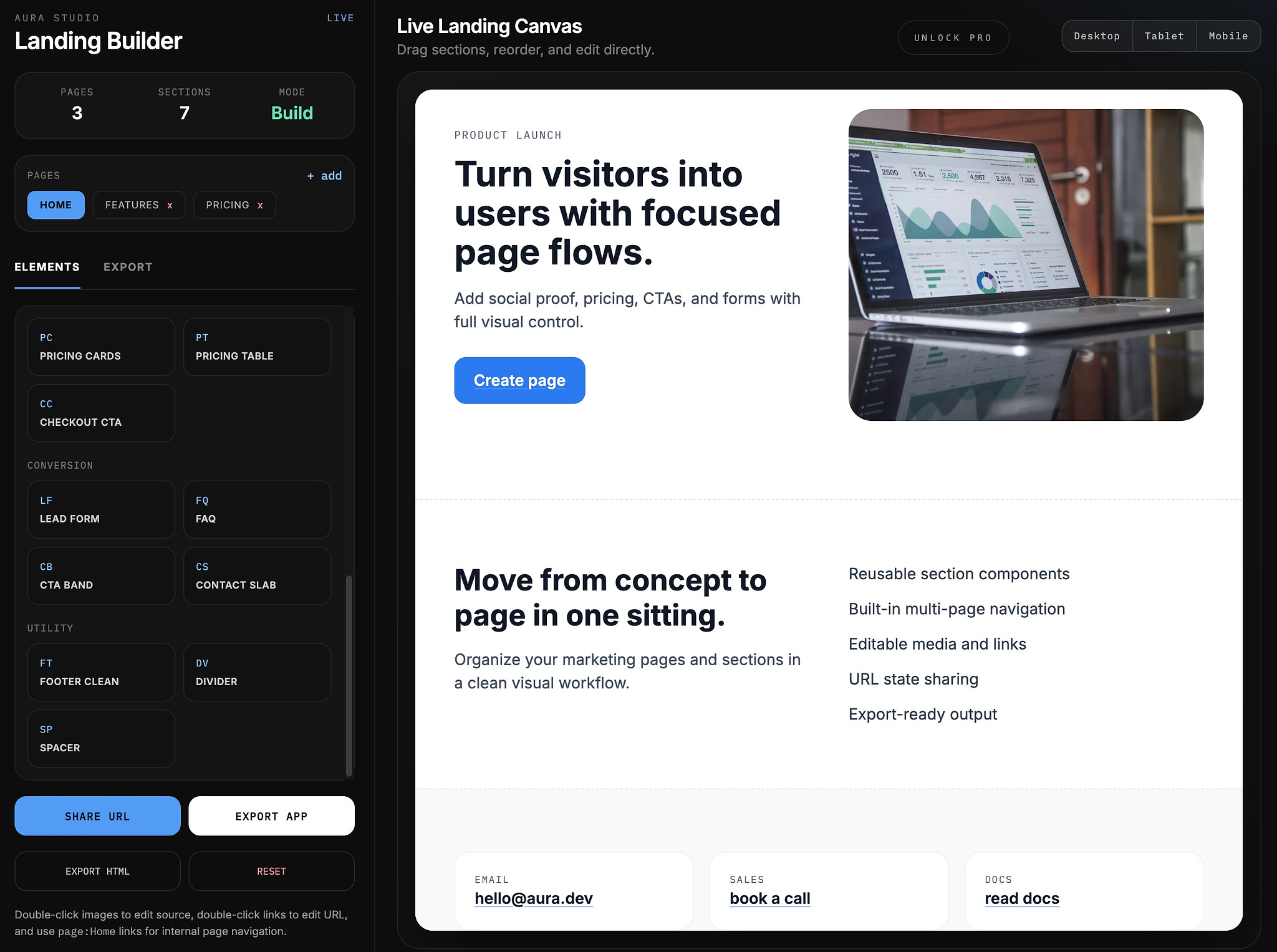
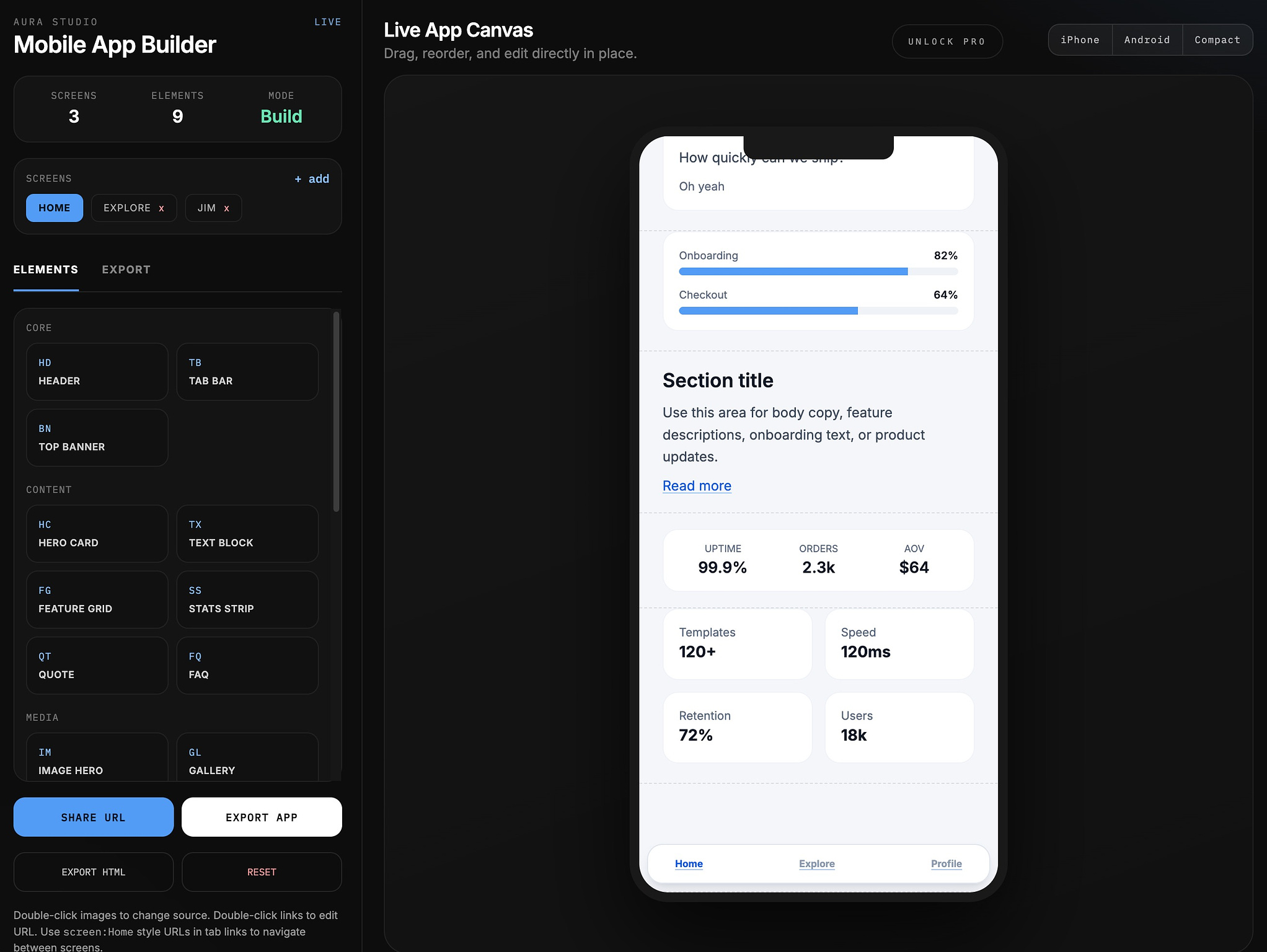
Build a Landing Page or Mobile App in Minutes

We're crushing it this week with releases and plenty more to come (our promise to release 50 useful tools in our bundle well on the way).

Check out: https://www.yuzool.com/aura.html

Most people don’t fail because they lack ideas. They fail because the gap between idea → execution feels too big.

You need:

  • A designer
  • A developer
  • Hosting
  • Integrations
  • Deployment
  • Time

So the idea sits. Aura changes that.

Speed is a Creative Superpower

When you can build something in minutes, three things happen:

  1. You experiment more
  2. You ship more
  3. You improve faster

Momentum compounds.

Instead of planning for weeks, you test today. Instead of polishing endlessly, you iterate publicly. Instead of overthinking, you move. Speed reduces fear.

Landing Pages Shouldn’t Be a Project

A landing page is not a startup.

It’s:

  • A headline
  • A promise
  • A call to action

That’s it.

Aura strips away the noise so you can:

  • Launch a product page
  • Validate an idea
  • Collect emails
  • Share a portfolio
  • Test messaging

Without signing up to another bloated platform.

Apps too

Mobile Apps Shouldn’t Require a Team

You don’t need a venture round to build something useful.

Sometimes you just need:

  • A focused interface
  • A simple workflow
  • A clean design

Aura lets you prototype and publish fast - so your idea becomes real before doubt kicks in.

Minutes Change Psychology

When something takes weeks, you hesitate. When something takes minutes, you try. And trying is everything.

The barrier to creation drops. The cost of mistakes drops. The risk feels smaller. The upside stays large. That’s leverage.

Why This Matters Now

We’re in an era where:

  • AI writes
  • Builders build
  • Creators ship

The advantage isn’t access anymore. It’s execution speed. Aura is built for that.

No bloat. No friction. No waiting.

Just build → ship → refine.

In minutes. Give it a try!

A Small Update That Changes How Everything Feels

Today’s update wasn’t about adding “features.” It was about removing friction.

Over the last few weeks, The Studio has been growing steadily - more tools, more use cases, more reasons to come back. But something subtle started to matter more than what was available:

How fast can you get back to what you were doing?

This update is my answer to that question.


A New Tool: Invoice Terminal

The biggest visible addition is Invoice Terminal.

It does one thing well: let you create and send a professional invoice in under a minute.

No accounts. No templates to fight with. No dashboards pretending to be finance software.

Just:

  • open
  • fill (including add payment links)
  • export
  • send

It fits the Studio philosophy perfectly: a focused tool that exists to be used, not configured.


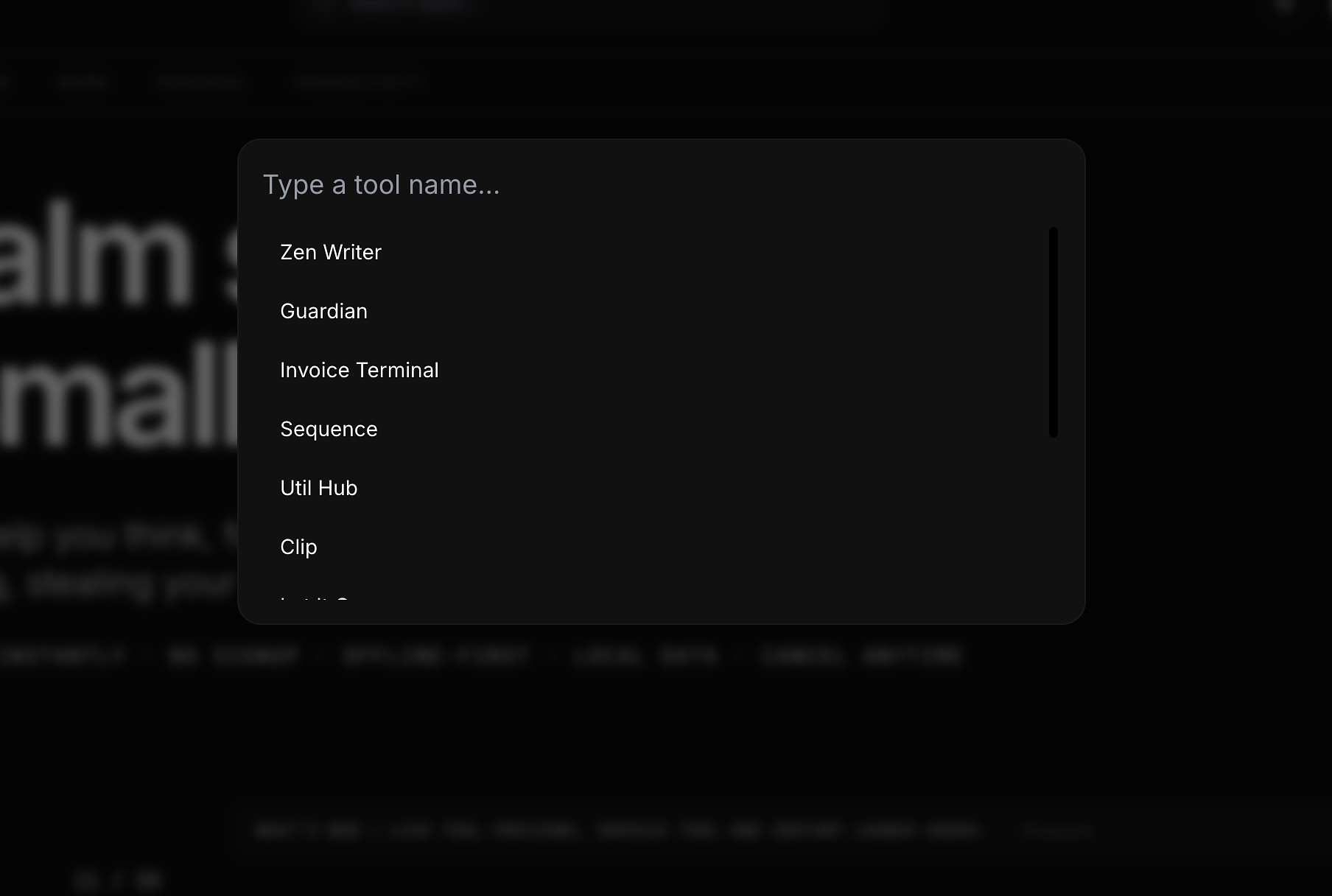
The Keyboard Launcher (⌘K)

The Keyboard Launcher (⌘K)

This is the change that quietly transforms everything.

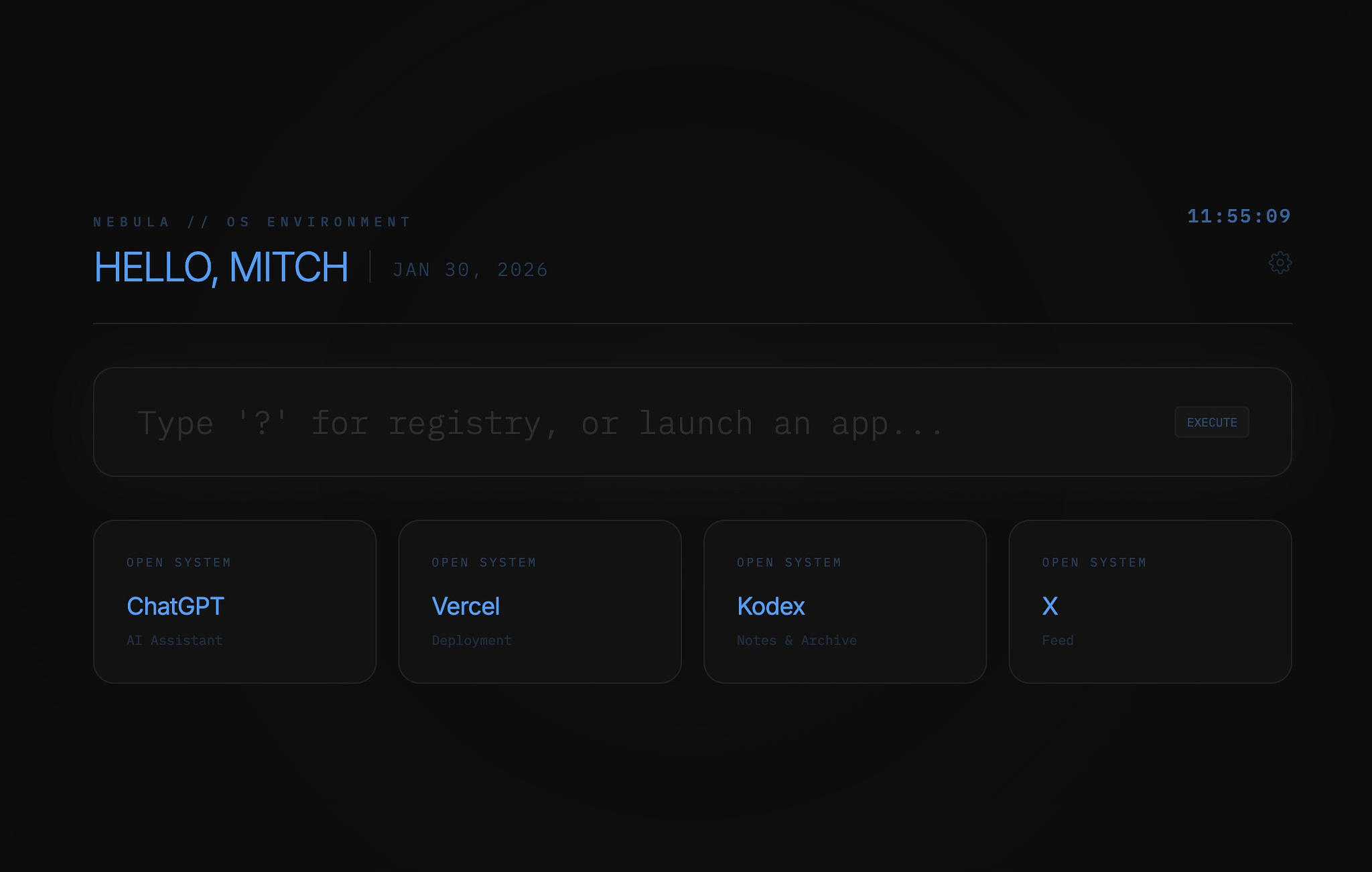
You can now press ⌘K (or Ctrl+K) anywhere in The Studio to open a launcher and jump directly to a tool.

No scrolling. No scanning grids. No thinking.

Even better:

  • The last tool you used is always first
  • It’s pre-selected
  • Press Enter and you’re instantly back where you left off

This turns The Studio from a “collection of tools” into something closer to a workspace.


“What’s New” (Without the Noise)

Software updates shouldn’t feel like announcements.

A small What’s New strip now appears only when something meaningful has changed - and only once. Dismiss it, and it stays gone.

No notifications. No badges everywhere. No interruption.

Just a quiet nudge if you care.


Smarter Defaults for Returning Users

A few changes you might not notice immediately - but you’ll feel them:

  • The last-used tool is subtly highlighted in the grid
  • Pro users land directly on a cleaner, dashboard-style view
  • Discovery elements fade away once you no longer need them

The Studio now adapts based on how you use it, without tracking, accounts, or analytics.

Everything is stored locally. Everything stays private.


Why These Changes Matter

This update wasn’t about adding more. It was about respecting momentum.

When tools get out of the way:

  • you think less
  • you hesitate less
  • you return more often

That’s the kind of software I want to build.

Quiet. Fast. Intentional.

As always, thank you for using The Studio - and for trusting software that stays on your side.

Focus on four

Focus on Four

An essentialist approach to work - like choosing just four key things to focus on each day - is powerful because it forces you to spend your limited time, energy, and attention on what actually moves the needle instead of scattering them across dozens of low‑impact tasks. This kind of deliberate focus is one of the most reliable ways to become genuinely productive rather than just endlessly busy.​

https://www.yuzool.com/daily-four.html

Why too many priorities kill progress

When you carry a long list of “priorities,” you constantly switch contexts, react to whatever feels most urgent, and rarely finish what matters most. As the essentialist idea puts it, if you have more than three or four priorities, you effectively have none, because your effort gets diluted until everything is done halfway and nothing feels truly meaningful.​

The power of a daily blank canvas

Starting each day with a cleared list - a blank canvas - forces you to decide again what today is for instead of blindly continuing yesterday’s leftovers. This reset reduces mental clutter, lowers anxiety, and gives you a fresh chance to align your actions with your real goals, not just your inbox or notifications.​

Choosing four: constraint as a creative tool

Limiting yourself to four focus items is a productive constraint: it makes you choose, and that choice is where strategy begins. By acknowledging you can only effectively push a few things forward each day, you naturally prioritize deep work, meaningful progress, and tasks that compound over time, rather than shallow busywork.​

Clear priorities, clearer mind

When your day is defined by just a handful of clearly chosen tasks, it becomes easier to say no to distractions and unplanned requests that don’t fit. Your mind has a simple operating script - “finish the four” - which reduces decision fatigue and lets you channel more energy into execution instead of constantly renegotiating what to do next.​

Essentialism as a daily practice

Essentialism works not as a one‑time planning exercise but as a daily ritual of asking: “What are the few things that truly matter today?” Turning that question into a habit gives you a steady rhythm: decide what’s essential, write it down, clear everything else away, and ship those few things with intention and calm.​

Designing a Personal Operating System

Productivity often breaks down not because of effort, but because of ambiguity.

Too many tools. Too many priorities. Too many open loops.

One effective response is designing a personal operating system — a simple framework that defines how work, focus, and decisions are handled.

Not software. Not an app. A system.


What Is a Personal Operating System?

A personal OS is a lightweight reference that answers:

  • What deserves attention right now?
  • What rules reduce friction?
  • What does “enough” look like?
  • How do I reset when things feel scattered?

It exists to reduce decision fatigue, not increase structure.

Personal OS dashboard page

Core Components of a Personal OS

1. Current Focus
A short statement of priority prevents drift and overcommitment.

2. Operating Principles
Constraints remove unnecessary choices and protect energy.

3. Definition of Enough
Clear limits prevent endless optimization and scope creep.

4. System Overview
A minimal map of where ideas, tasks, and completed work live.

5. Reset Protocol
A repeatable way to return to clarity during overload.


Why It Works

A personal OS improves productivity by:

  • Reducing context switching
  • Eliminating repeated decisions
  • Creating consistency
  • Encouraging calm execution

Rather than motivating action, it stabilizes it.


Final Thought

Well-designed systems don’t demand attention. They quietly support it.

A personal OS doesn’t need to be perfect. It just needs to be trusted.

That trust compounds.

Why softness became a default in SaaS

Softness did not appear by accident. It emerged from a set of incentives that made sense at the time.

As SaaS moved from technical users to mass markets, products needed to feel safe. Friendly colors. Rounded corners. Smiling illustrations. Gentle microcopy. Everything designed to say: “Don’t worry. You can’t break this.”

Softness reduced friction for first-time users. It lowered anxiety. It tested well.

Then it spread.

Design systems optimized for onboarding became universal. Tools meant for professionals adopted the visual language of consumer apps. Serious workflows were wrapped in pastel gradients and reassuring language.

Softness became a proxy for usability.

But something was lost in the process.

Soft interfaces often hide structure. They blur hierarchy. They trade clarity for comfort. For power users, this creates fatigue. The interface feels polite but imprecise. Friendly but slow.

Softness also flattens identity. When everyone uses the same rounded cards, muted palettes, and cheerful tone, differentiation collapses. Products feel interchangeable.

The default aesthetic became safe, not intentional.

This does not mean softness is wrong. It means it is a choice, not a neutral baseline.

For tools built around speed, focus, and leverage, softness can work against the product. It can obscure intent. It can slow decision-making. It can turn serious work into something vaguely performative.

The question is not “Is this pleasant?”
The question is “Does this reinforce how the product is meant to be used?”

When the answer is no, softness becomes a liability.

The forgotten art of building in private

There's a pervasive idea in online business right now: if you're building something, you should broadcast it. Share your progress. Document the journey. Build in public.

For some people, this works beautifully. The accountability helps. The feedback sharpens. The audience grows alongside the product.

But for others, it's a distraction dressed as best practice.

Building in public has real costs that rarely get discussed. The pressure to perform. The urge to pivot based on early reactions. The temptation to optimize for engagement over actual progress. The way every small decision suddenly needs an explanation.

The internet doesn't need more half-finished announcements. It needs more finished things.

What gets lost in the spotlight

When you announce a project early, something subtle shifts. The work becomes performance. Progress posts replace actual progress. You start optimizing for the story instead of the product.

Early ideas are fragile. They need space to evolve without judgment. Most projects go through an awkward phase where nothing makes sense yet, where everything feels uncertain, where the only way forward is messy experimentation.

That phase doesn't perform well on social media.

So builders start skipping it. They polish too early. They commit to directions before they've actually tested them. They defend choices publicly that they'd quietly abandon in private.

Building in public often means building for public. Those are different things.

Secrecy as strategy, not shame

Working in private isn't about hiding. It's about protecting the conditions that allow good work to happen.

When no one is watching, you can:

  • Change direction without explaining yourself
  • Try ideas that sound ridiculous
  • Fail quietly and learn from it
  • Take the slow path when it's better
  • Focus on what works instead of what looks good

Some of the most enduring products were built this way. Tools that appeared fully formed, not because they were rushed, but because they were refined in silence until they actually worked.

Basecamp didn't live-tweet its development. Craigslist didn't build an audience before building the product. Plenty of successful SaaS tools launched quietly, improved privately, and grew through usefulness rather than updates.

The right people will find you anyway

Here's what actually happens when you build something useful in private:

People search for solutions. They find your thing. It solves their problem. They tell someone else.

That's it. No threads. No launch announcements. No follower count.

Search is still how most people discover tools, guides, and services. Word of mouth is still how trust spreads. Usefulness compounds whether or not you have an audience.

The idea that you need visibility to succeed is mostly a myth perpetuated by people selling visibility.

What you actually need is something that works, a way for people to find it, and patience while it spreads.

When to emerge (and why it matters)

Building in private doesn't mean staying hidden forever. It means choosing when you go public with intention.

The right time is usually later than you think. Not when you're excited. Not when you've written the first draft. Not when it's functional.

The right time is when it's ready to stand on its own. When you've tested it enough to know it works. When feedback would improve it rather than derail it. When you can handle criticism without second-guessing the foundation.

Launching quietly from a position of readiness is far more effective than launching loudly from a position of hope.

The psychological freedom of working without an audience

The most underrated benefit of building in private is simple: you get to think clearly.

No notifications pulling you away. No comments shaping your decisions. No pressure to maintain momentum for the sake of appearances.

Just the work, and whether it's actually getting better.

This is where quiet builders have a real advantage. They're not distracted by the meta-work of documenting, engaging, and performing progress. They're just building. Slowly, carefully, without fanfare.

And when they do share something, it's because it's ready. Not because the algorithm demanded an update.

The path forward

If you've been building in public and it's working for you, keep going. Some people thrive in that environment.

But if it's draining you, if the performance is getting in the way of the work, if you're spending more time talking about building than actually building, here's permission to stop.

Go quiet. Work in private. Let the project evolve without an audience.

No updates. No announcements. No build logs.

Just steady, uninterrupted work done in silence until it's ready.

The internet will still be here when you're done. And your thing will be better for the time it spent out of the spotlight.

Build in private. Launch when ready. Let the work speak for itself.

That's the quieter path. And it works just fine.

100 businesses you could start tomorrow

You don’t need a revolutionary idea. You need movement. Start before you feel ready.

Most successful businesses didn’t start as grand visions. They started as useful responses to real problems.

Momentum creates clarity - not the other way around.

Each idea includes:

  • Idea
  • Why it works
  • Real-world example

Digital & Service Businesses

  1. Newsletter curation - People want filtered insight - Morning Brew
  2. Niche job board - Hiring is fragmented - Remote OK
  3. Website copywriting - Words sell - Many solo freelancers
  4. Landing page audits - Conversion is confusing - Growth agencies
  5. No-code website builds - Speed matters - Webflow experts
  6. SEO content service - Traffic compounds - Content agencies
  7. Podcast editing - Creators hate editing - Podcast editors
  8. Short-form video editing - Attention moved - TikTok editors
  9. Ghostwriting for founders - Ideas need voice - LinkedIn ghostwriters
  10. Email deliverability consulting - Emails fail silently - Specialist consultants

AI & Automation

  1. AI prompt library - People want shortcuts - Prompt marketplaces
  2. AI customer support setup - Businesses want scale - Intercom users
  3. AI content repurposing - One idea, many formats - Repurpose.io
  4. Internal AI tools for teams - Efficiency sells - Custom GPT builders
  5. AI resume optimization - Hiring is automated - Resume tools
  6. AI chatbot for local businesses - Availability matters - Website bots
  7. AI meeting summaries - Meetings waste time - Fireflies.ai
  8. AI research assistant - Information overload - Perplexity
  9. AI email personalization - Relevance converts - Outbound tools
  10. AI compliance monitoring - Rules change - RegTech startups

Simple Products & Micro-SaaS

  1. Habit tracker - Behavior change is hard - HabitKit
  2. Daily focus app - Distraction is common - One Thing apps
  3. Personal CRM - Relationships matter - Clay
  4. Bookmark organizer - Knowledge is messy - Raindrop
  5. Expense splitter - Money causes friction - Splitwise
  6. Time tracking for freelancers - Billing clarity - Toggl
  7. Minimal note app - Complexity repels - Bear
  8. Writing streak tracker - Consistency wins - 750words
  9. Screenshot organizer - Digital clutter grows - CleanShot
  10. Micro-invoicing tool - Small businesses need simple tools - Invoice Ninja

Education & Knowledge

  1. Paid Notion templates - People copy systems - Notion marketplace
  2. Mini-courses - Short beats long - Gumroad creators
  3. Interview-based newsletters - Wisdom scales - Trends
  4. Skill-specific coaching - Specific sells - Career coaches
  5. AI literacy workshops - Fear meets demand - Corporate trainers
  6. Study accountability groups - Motivation needs structure - Study Discords
  7. Language micro-learning - Small steps work - Duolingo
  8. Exam prep communities - Stress drives demand - Prep forums
  9. Industry explainers - Complexity confuses - Stratechery
  10. Career transition guides - Paths are unclear - Bootcamp blogs

Local & Real-World Businesses

  1. Local SEO agency - Visibility matters - Local marketers
  2. Home service lead gen - Leads are lifeblood - Angi
  3. Airbnb cleaning service - Turnover is constant - Local cleaners
  4. Property inspection reports - Peace of mind sells - Inspectors
  5. Moving coordination service - Moving is chaos - Concierge movers
  6. Senior tech support - Gap exists - Local helpers
  7. Neighborhood newsletter - Local info matters - Substack locals
  8. Mobile car detailing - Convenience wins - Detailers
  9. Event setup rentals - Logistics hurt - Party rentals
  10. Pet sitting coordination - Trust matters - Rover

Content, Media & Community

  1. Niche YouTube channel - Attention monetizes - Educational creators
  2. X niche account - Authority compounds - Anonymous accounts
  3. Paid Discord community - Belonging sells - Trading groups
  4. Curated resource sites - Time is scarce - Tool directories
  5. Weekly market brief - People want clarity - Financial newsletters
  6. Founder interview podcast - Stories teach - Indie podcasts
  7. Industry meme pages - Humor spreads - Niche IG pages
  8. Trend tracking blog - Early info matters - Exploding Topics
  9. Case study breakdowns - Learning by example - Marketing blogs
  10. Private mastermind - Proximity accelerates - Paid groups

E-commerce & Digital Goods

  1. Print-on-demand niche brand - Identity sells - Shopify stores
  2. Digital planners - Organization is aspirational - Etsy sellers
  3. Stock photo niche packs - Authentic beats generic - Creator packs
  4. Icon libraries - Design needs speed - Icon marketplaces
  5. Website themes - Aesthetics matter - ThemeForest
  6. Presentation templates - Slides waste time - Pitch decks
  7. Resume templates - First impressions matter - Canva
  8. Brand kits - Consistency sells - Brand designers
  9. Digital journals - Reflection is growing - Self-growth tools
  10. Micro-plugins - Small tools add value - Browser extensions

Finance, Ops & Boring (Profitable) Businesses

  1. Bookkeeping for creators - Money anxiety is real - Creator accountants
  2. Tax prep for freelancers - Complexity hurts - Specialist CPAs
  3. Payroll setup service - Compliance matters - HR consultants
  4. Vendor negotiation service - Savings are tangible - Procurement firms
  5. Expense auditing - Waste hides - Cost reduction consultants
  6. Contract review service - Legal fear exists - Legal tech
  7. SaaS spend optimization - Tools pile up - Spend tools
  8. Operations documentation - Chaos scales badly - Process consultants
  9. Compliance checklists - Rules intimidate - ISO consultants
  10. Business insurance advisory - Risk avoidance sells - Brokers

Personal & Lifestyle Businesses

  1. Digital declutter coaching - Overload is real - Minimalists
  2. Productivity coaching - Focus is scarce - Coaches
  3. Career clarity sessions - Confusion pays - Career mentors
  4. Life systems consulting - Structure helps - Notion coaches
  5. Sleep optimization consulting - Health sells - Biohackers
  6. Fitness accountability groups - Consistency beats plans - Online coaches
  7. Meal planning service - Decisions fatigue - Meal planners
  8. Habit accountability app - Behavior needs tracking - Habit apps
  9. Mindfulness for professionals - Stress is high - Corporate wellness
  10. Personal knowledge management setups - Notes are chaos - PKM coaches

Leverage-Based & Asymmetric Bets

  1. API wrapper business - Complexity hides value - Dev tools
  2. Data scraping service - Data is power - Lead tools
  3. Web monitoring alerts - Changes matter - Visualping
  4. Micro-acquisition holding company - Small buys scale - Tiny acquisitions
  5. Niche SaaS directory - Discovery matters - Product Hunt clones
  6. Paid research briefs - Insight beats info - Industry reports
  7. White-label SaaS - Speed matters - Resellers
  8. Open-source paid support - Trust exists - OSS companies
  9. Audience-first brand - Distribution is leverage - Creator brands
  10. Simple problem-first startup - Utility wins - Almost everything above

You don’t need certainty to act. You need responsibility.

The stoics believed action within your control was always preferable to waiting on outcomes you can’t command.

Starting something small is not reckless. Refusing to start out of fear is.

Most people won’t start. Not because they can’t - but because they wait for conditions that never arrive.

Those who begin imperfectly gain something others never do: momentum.

Start small. Start now. Adjust in motion.

More people need to start something

Most people are waiting.

Waiting for clarity.
Waiting for confidence.
Waiting for permission.

But the real problem isn’t lack of opportunity, it’s the belief that starting must be complicated.

This is a reminder that starting small is not a weakness.
It’s how almost everything real begins.

We live in an era of leverage.

Tools are cheap. Distribution is free. Knowledge is abundant.

Yet hesitation is everywhere.

People consume more than they create. They plan more than they act.

The barrier to entry has never been lower - but the willingness to begin has.

Creativity as a quiet life practice

Creativity, for a long time, felt like something that belonged to artists, geniuses, and “special” people. Over time, it became clear that creativity is really about bringing one’s inner nature into the world, in whatever quiet, ordinary, practical way is possible. It is the process of slowly becoming who you are, instead of who everyone else decided you should be.

Becoming quietly yourself

Life constantly pushes ready-made identities onto us: good employee, good child, impressive entrepreneur, productive citizen. Quiet ambition begins when you start questioning those scripts and notice that there is a you underneath them, with tastes, oddities, and stubborn preferences that do not fully match the expectations around you. Creativity, in this sense, is the ongoing work of letting that inner pattern take shape in the outer world.

That might mean building something in a way that feels right instead of the “growth-hacked” way, or choosing depth over speed when everything around you screams for quick wins. It is less about a grand breakthrough and more about thousands of small, faithful choices that align your actions with your inner sense of what fits you.

The danger of unused potential

There is a real cost to ignoring the things you feel secretly drawn to do. When you have ideas, talents, or longings that you repeatedly push down - because of fear, comparison, or tiredness - the energy does not disappear. It tends to turn inward and sour, showing up as irritability, numbness, anxiety, or that vague feeling that life is somehow off, even if it looks fine from the outside.

Quiet ambition means respecting that inner pressure. It does not require chasing fame or building an empire; it simply means not betraying the part of you that wants to make something, improve something, or explore something. A small project done with sincerity can be more psychologically healthy than a big performance done just to impress.

Joy as a side effect of unfolding

There is a difference between chasing happiness and allowing joy. Happiness often depends on circumstances going well: good numbers, good feedback, good days. Joy, on the other hand, tends to appear when you are deeply engaged in something that feels like it belongs to you, even if it is challenging or uncertain.

Quiet ambition is built around this kind of joy. It values the feeling of working on the right problem over the feeling of constantly winning. You might be debugging code late at night, reworking a sentence, or sketching out a product idea that may or may not “work,” yet something in you feels more awake and more present than during any moment of passive comfort.

Growth that requires letting go

Every real change requires some kind of loss. To grow into a truer version of yourself, certain habits, masks, and comforts have to fall away. That can feel like a small death: the death of the persona that pleased everyone, the death of the identity built only around achievement, or the death of the belief that you must always know exactly where you are going.

Quiet ambition accepts this as part of the process. It understands that there will be seasons where nothing seems to move, where projects stall, where direction blurs. Those moments are not proof that you are lost forever; they are often the psychological “winter” in which new roots are growing below the surface.

Listening to the inner signal

One of the most painful things a person can face is the realisation, later in life, that they did not live their own life, but a well-behaved imitation of what others wanted. The quiet inner signal - intuition, hunch, calling, whatever you want to name it - often cannot be defended logically to other people, but it has a recognisable feel: a mix of pull, fear, and strange rightness.

A life of quiet ambition is organised around that signal. It does not require shouting your plans to the world; it asks instead for consistent, almost modest loyalty to what feels inwardly true. That might mean protecting time for thinking and building, saying no to paths that are impressive but dead inside, and allowing yourself to care about things that do not look flashy from the outside.

In the end, creativity is not a luxury; it is how a person becomes real. When you let your particular way of seeing and making slowly take form in the world, you reduce regret and resentment, and you give your days a sense of quiet, grounded meaning. That is the heart of quiet ambition: not noise, not spectacle, but a steady, personal unfolding into the life that fits you.